Lesson Objective
This lesson explores shutter speed in depth, teaching you how to control motion in your photographs. By the end, you will understand how to freeze fast action, create intentional motion blur, execute long exposures, and avoid unwanted blur from camera shake, transforming shutter speed from a technical necessity into a creative tool.
What You Will Learn
- How mechanical and electronic shutters function
- The relationship between shutter speed and motion
- Guidelines for selecting appropriate shutter speeds
- Techniques for freezing fast-moving subjects
- Creative applications of intentional motion blur
- Long exposure photography fundamentals
- How to avoid camera shake and subject blur
Required Knowledge or Tools
Complete Lessons 1 through 4 before beginning this lesson. A camera with Shutter Priority mode (S or Tv) or Manual mode is required for the practical exercises. A tripod is helpful for long exposure exercises but not essential for all parts of this lesson. Having moving subjects available, such as passing vehicles, running water, or active people, will enhance your practice.
Core Concept Explanation
Shutter speed determines how long your camera's sensor is exposed to light. It is typically expressed as a fraction of a second, such as 1/500, meaning the sensor is exposed for one five-hundredth of a second. Longer exposures, like one second or more, are written as whole numbers, sometimes with a quotation mark (1") to distinguish them from fractions.
The shutter speed scale follows a predictable pattern where each step doubles or halves the exposure time. Common speeds include 1/1000, 1/500, 1/250, 1/125, 1/60, 1/30, 1/15, 1/8, 1/4, 1/2, and 1 second. Moving from 1/250 to 1/125 doubles your exposure time and lets in twice as much light, equivalent to opening your aperture by one stop.
Mechanical vs. Electronic Shutters
Most cameras use mechanical shutters consisting of physical curtains that travel across the sensor. When you press the shutter button, the first curtain opens to start the exposure, and the second curtain closes to end it. At very fast shutter speeds, the second curtain begins closing before the first has fully opened, creating a moving slit that travels across the sensor.
Many modern cameras also offer electronic shutters, which turn the sensor on and off without physical curtains. Electronic shutters can achieve faster speeds, operate silently, and eliminate mechanical wear. However, they may introduce rolling shutter effects with fast-moving subjects, where different parts of the image are captured at slightly different times, causing distortion.
Motion and Shutter Speed
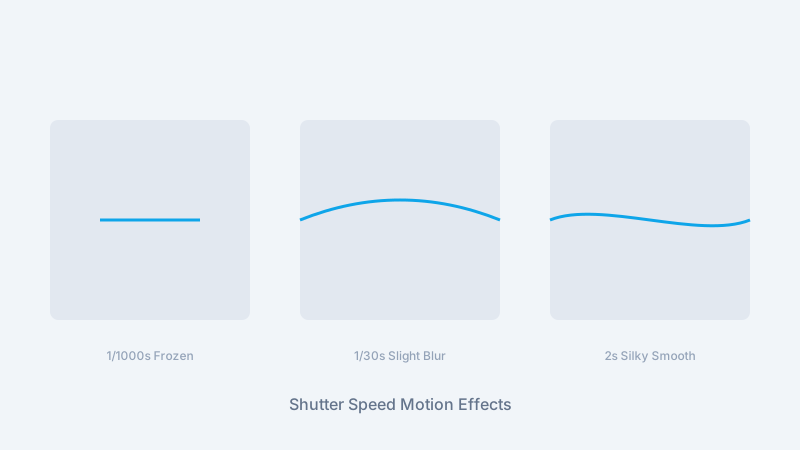
When your sensor is exposed, it records everything happening during that time. A fast-moving subject covers significant distance even in a fraction of a second. If your shutter speed is too slow, that movement appears as blur in your image. Faster shutter speeds capture shorter slices of time, freezing motion more effectively.
The required shutter speed to freeze motion depends on multiple factors: how fast the subject moves, how far away it is, the direction of movement relative to the camera, and your intended use of the final image. A subject moving toward or away from you requires less speed to freeze than one moving across your frame at the same velocity.
Camera Shake
Even with stationary subjects, slow shutter speeds can produce blur from camera movement during exposure. The traditional rule suggests using a shutter speed equal to or faster than one divided by your focal length. With a 100mm lens, use at least 1/100 second. With a 50mm lens, use at least 1/50 second. Image stabilization, available in many modern cameras and lenses, allows slower speeds by compensating for small movements.
Why This Lesson Matters
Shutter speed control determines whether your images appear frozen in time, suggest motion through blur, or capture extended periods in single frames. This control is essential for sports photography, wildlife photography, creative long exposures, and even everyday situations where lighting conditions challenge your ability to use ideal settings.
Understanding shutter speed also helps you troubleshoot blurry images. When photographs appear soft despite proper focus, the culprit is often shutter speed, either too slow to freeze subject motion or too slow to avoid camera shake. Diagnosing these issues quickly lets you adjust and capture the shot before the moment passes.
Step-by-Step Tutorial
Practice Freezing Motion
Find a moving subject like passing vehicles or a running person. Set your camera to Shutter Priority mode and select 1/1000 second. Take photographs of the moving subject. Review them to confirm sharp, frozen motion. If light is limited, your camera will compensate with wider aperture or higher ISO.
Create Intentional Motion Blur
With the same moving subject, slow your shutter speed to 1/30 second or slower. The subject will now show motion blur while stationary elements remain sharp. Experiment with different speeds to find the balance between recognizable subject and suggested motion.
Practice Panning
Panning involves moving your camera to follow a moving subject during exposure. Set a moderate shutter speed like 1/60 second. As a subject passes, smoothly rotate your camera to track it while pressing the shutter. Done correctly, the subject appears relatively sharp while the background shows horizontal blur, conveying speed.
Test Your Handheld Limits
Photograph a stationary subject at progressively slower shutter speeds without a tripod. Start at 1/250 second and slow down step by step. Review each image at 100% magnification to determine when camera shake becomes visible. This establishes your personal handheld limit with your current equipment.
Experiment with Long Exposure
If you have a tripod, try a long exposure of several seconds or more. Moving water transforms into smooth silk. Car headlights become light trails. Clouds streak across the sky. Use a narrow aperture and low ISO to achieve these longer exposures even in moderate light.
Common Mistakes and Misunderstandings
Assuming Faster Is Always Better
While fast shutter speeds freeze motion effectively, they are not always the best choice. Sometimes motion blur enhances an image by conveying action and energy. A race car frozen in place can look parked; slight wheel blur suggests speed. Choose shutter speeds that serve your creative intent.
Forgetting About Reciprocal Relationships
Changing shutter speed affects exposure. When you double your shutter speed to freeze action, you halve the light reaching your sensor. You must compensate with aperture or ISO to maintain proper exposure. Always consider the entire exposure triangle when adjusting any single element.
Confusing Camera Shake and Subject Blur
Camera shake blurs the entire image uniformly. Subject blur affects only moving elements while stationary parts remain sharp. Diagnosing which type of blur affected your image helps you choose the appropriate solution: stabilization or support for camera shake, faster shutter speed for subject blur.
Practical Example or Scenario
You are photographing your child's soccer game on a cloudy afternoon. The limited light challenges your exposure options. In Shutter Priority mode, you set 1/500 second to freeze the action, but your camera selects f/4 and ISO 1600 to compensate. The images are sharp but show noticeable noise at ISO 1600.
You consider your options. Accepting 1/250 second would allow ISO 800, reducing noise, but might not completely freeze fast kicks. Testing confirms that 1/250 works for most action but shows slight blur during the fastest movements. You decide this trade-off is acceptable, preferring lower noise with occasional slight blur over consistently grainy images.
Later, you try panning shots. At 1/60 second, you track a running player, keeping them relatively sharp while the crowd and field blur into streaks of color. These images feel more dynamic than the frozen shots, conveying the excitement and speed of the game in a way static freezes cannot.
Bulb Mode for Extended Exposures
Most cameras limit maximum shutter speed to 30 seconds in normal modes. For longer exposures, use Bulb mode (B), which keeps the shutter open as long as you hold the button. A remote release prevents camera shake during these extended exposures. Bulb mode enables star trails, lightning captures, and extreme long exposures lasting minutes or even hours.
Lesson Summary
- Shutter speed controls how long the sensor is exposed to light
- Fast shutter speeds freeze motion; slow speeds blur motion
- The reciprocal rule (1/focal length) helps avoid camera shake handheld
- Motion blur can be either a problem to solve or a creative tool to embrace
- Panning creates sharp subjects against blurred backgrounds
- Long exposures transform moving elements into smooth, ethereal renditions
- Shutter speed changes require compensating adjustments to aperture or ISO